
Before You Start
Make sure:
-
Driver pay items are assigned to the driver
If no items are assigned, the system will not calculate pay.
Step 1: Open the Trip
-
Go to Dispatch
-
Open the trip
-
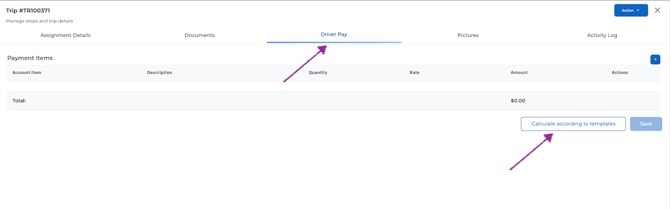
Navigate to the Driver Pay tab
Step 2: Calculate Driver Pay
Click “Calculate according to template.”
The system will:
-
Apply the driver’s pay items
-
Generate pay line items based on the trip
If no items are assigned, an alert will appear.
Step 3: Review and Adjust Pay
You can edit the calculated values before settlement.
-
Adjust quantity (miles or base amount)
-
Update rates (percentage or per mile)
-
Add additional pay items (detention, bonus, etc.)
Example:
If a driver only handled part of a load, adjust the base amount to reflect their portion.
Step 4: Save Changes
Click Save after reviewing and updating driver pay.
At this point, the trip is ready for settlement.
Step 5: Create a Settlement
-
Go to Accounting → Driver Pay Manager
-
Open Settlement Planning
-
Select the driver
-
Select one or more trips
-
Click Create Settlement
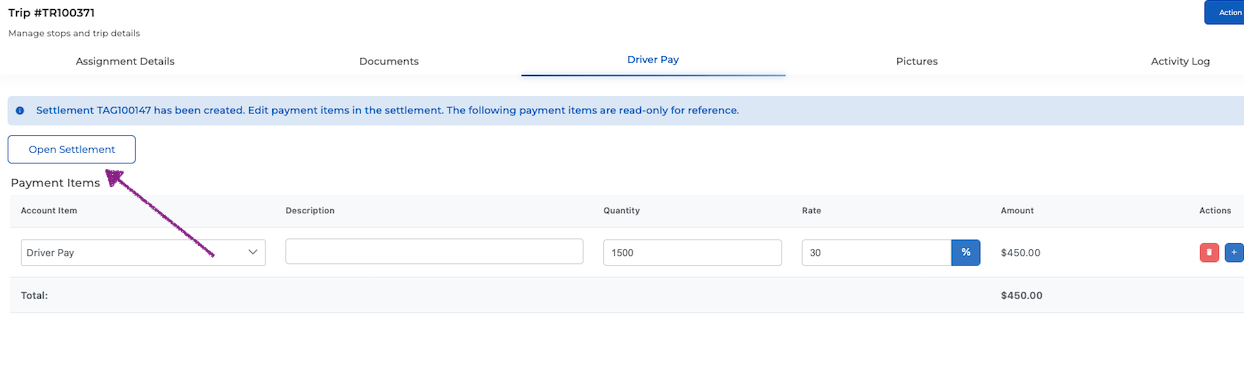
The system will pull in driver pay from each trip, including any adjustments.
How Calculation Works in Settlement
-
If a trip was already calculated in the trip tab, those values are used
-
If a trip was not calculated, the system calculates it during settlement
Step 6: Review in Settlement
In the settlement, you can:
-
Review pay items
-
Make final adjustments
-
Approve for payroll
Important Notes
Once a trip is included in a settlement:
-
The trip becomes read-only for driver pay
-
Changes in the trip will not affect the settlement
To make changes after settlement:
-
Delete the settlement
-
Update the trip
-
Recreate the settlement
Recalculation behavior:
-
The system does not overwrite existing pay
-
To recalculate, delete the pay items, save, and reopen the settlement
Summary
Trip-level driver pay is used to prepare and adjust pay during operations.
Settlement is used to review and finalize pay for payroll.