
🎥Video Tutorial🎥
What is the Chart of Accounts?
The Chart of Accounts is where Truckpedia stores all the items and categories used across your accounting. It has two sections:
- Accounts — General categories used internally by Truckpedia for tracking revenue, expenses, and reports.
- Items — The specific line items that appear on your customer invoices, rate sheets, and driver pay settlements. This is what you'll be working with most of the time.
QuickBooks users: If you're syncing with QuickBooks Online or Desktop, make sure your item names match exactly what you have in QuickBooks — these are the items that get synced.
If something is missing from a rate sheet or driver settlement, this is where you add it.
How to Get There
- Open the left side menu and go to Accounting.
- In the top menu, click Chart of Accounts.
- Select the Items tab.
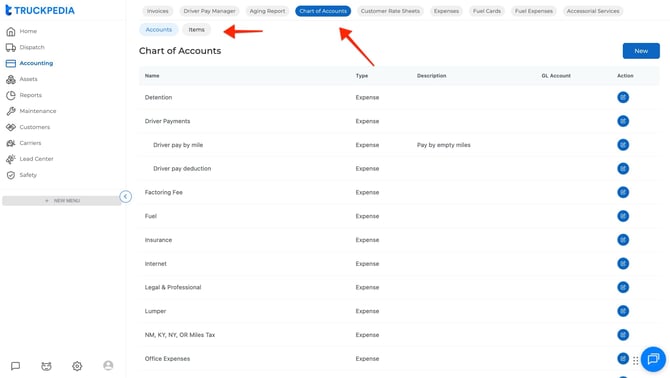
How to Create a New Item
- Click New.
- Enter a name for the item (e.g., Detention, Fuel Surcharge, Layover).
- Optionally add a description — this will appear on the settlement or invoice by default. Drivers and customers can both see it. You can remove it when creating a specific settlement or invoice if needed.
- Select whether it is an Income or Expense account using the dropdown, then choose a category.
- Optionally enter a code — this is for internal accounting purposes only, if your team already uses item codes. Leave it blank if not.
- Click Submit.
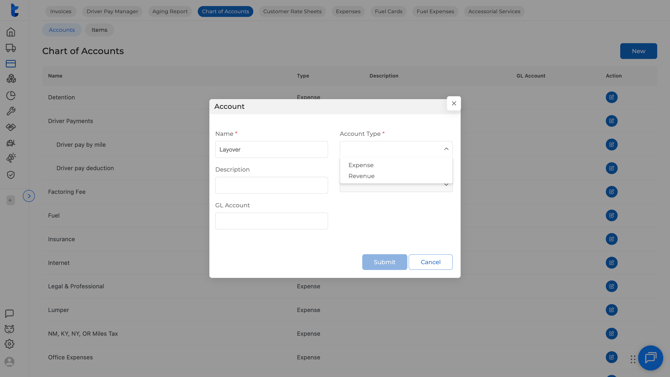
The item is now saved and available to use in any customer invoice, rate sheet, or driver settlement.
What's Next?
- Want to automate your customer rate sheets using these items? → [Click here]
- Want to automate driver pay settlements using these items? → [Click here]