
📹VIDEO: HOW TO IMPORT LOADS? 📹
📋 Step-by-Step Guide
Follow these simple steps to import your loads into the system:
Step 1: Navigate to the Dispatch Section
Click on Dispatch. From there, open the Load List view.
%202.43.09%20p.m..png?width=670&height=346&name=Captura%20de%20pantalla%202026-05-18%20a%20la(s)%202.43.09%20p.m..png)
Step 2: Open the Import Tool
On the upper-right corner of the load list screen, locate and click the Import button.
%202.43.38%20p.m..png?width=670&height=366&name=Captura%20de%20pantalla%202026-05-18%20a%20la(s)%202.43.38%20p.m..png)
Step 3: Download the Official Template
To ensure the system processes your data perfectly, you must match our formatting. Click Download Template to get the starter CSV file.
%202.43.59%20p.m..png?width=670&height=355&name=Captura%20de%20pantalla%202026-05-18%20a%20la(s)%202.43.59%20p.m..png)
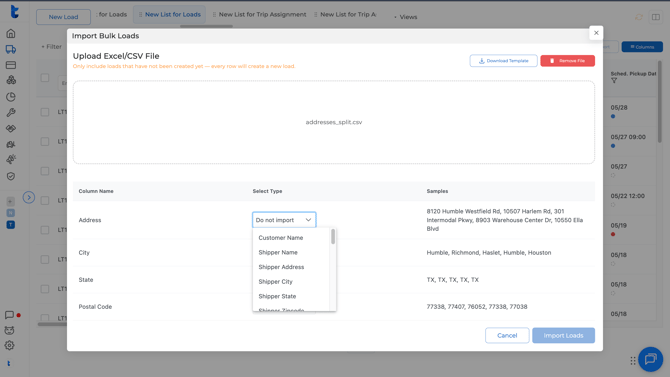
Step 4: Populate and Upload Your File
Open the downloaded CSV file, copy or enter your specific load data under the correct columns, and save it. Go back to the import interface, click upload, and select your file to process it into the system.
%202.44.18%20p.m..png?width=670&height=367&name=Captura%20de%20pantalla%202026-05-18%20a%20la(s)%202.44.18%20p.m..png)
At the moment of importing into Truckpedia, you will be able to map the columns and choose to omit or skip specific data that you do not want to import.
Important: Please double-check that your columns perfectly match the document descriptions; otherwise, the system will not allow you to complete the import. Once everything matches up and is ready, the data will be successfully added directly into your active loads!
Need Help? If you experience formatting issues with your CSV files or have any questions, please reach out to us for any assistance at help@truckpedia.io.